Construction expense tracking software for Kenyan contractors.
Construction expense tracking software records every site cost against a project as it happens: materials, casual wages, subcontractors and overheads. MjengoKit captures each expense as a request, gets it approved and records the payment, so your totals are live instead of being rebuilt from receipts at month end.
Receipts and WhatsApp are not an expense system.
Site expenses are small, frequent and spread across many people, which is why they are so hard to control.
Expenses recorded after the fact
By the time receipts reach the office, the money has gone and the details have been forgotten.
Costs not tied to a project
When a supplier serves three sites, it takes real work to split a statement by project.
Totals that only exist at month end
If reconciling takes weeks, you are always steering by last month's figures.
Capture the expense when it begins, not after.
MjengoKit treats each expense as Request, Approve, Pay, Track, so the record exists before the money moves.
-
Request
Site staff raise a requisition with the project, amount, reason and cost type.
-
Approve
The right people review it from a phone or laptop before anything is committed.
-
Pay
Finance pays by M-Pesa or bank, or marks it paid if it was settled another way.
-
Track
Spending updates by project, category and period, with what remains outstanding.

Money moves clockwise from requisition to approval to payment.
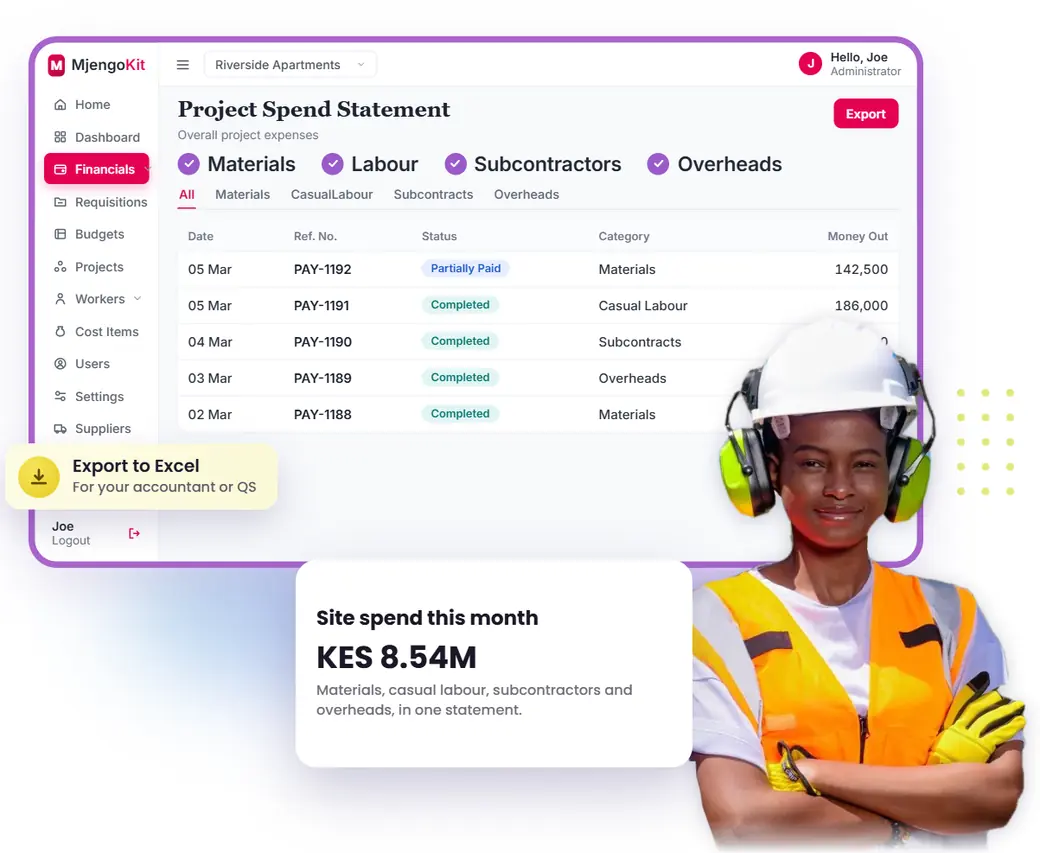
Every expense, by project and category.
See what each site spent, on what, approved by whom, without chasing receipts.
- Materials, casual labour, subcontractors and overheads
- Spending by project, cost item and period
- Requested, approved, paid and outstanding totals
- Who asked for each expense, and who approved it
- Cash statement and spend analysis
- Export to Excel for your accountant

Illustrative figures.
Example: a week of site expenses
How one project's spending might look. Figures are illustrative.
| Cost type | Requested | Approved | Paid | Outstanding |
|---|---|---|---|---|
| Materials | KES 640,000 | KES 610,000 | KES 420,000 | KES 190,000 |
| Casual labour | KES 186,000 | KES 186,000 | KES 186,000 | KES 0 |
| Subcontractors | KES 240,000 | KES 240,000 | KES 120,000 | KES 120,000 |
| Overheads | KES 38,500 | KES 32,000 | KES 32,000 | KES 0 |
Spreadsheet or software?
A good fit
- Several sites, several people spending and approving
- You want approvals before money leaves, not just a record
- You need totals by project without weeks of reconciling
Probably not the right tool
- One small job where you make every purchase yourself: a good spreadsheet may be enough
- You only want to scan receipts for tax claims
Frequently asked questions
How do contractors track project expenses?
Many use a spreadsheet, a receipt file and M-Pesa statements. The better practice is to record each expense against a project and cost item when it is requested, approve it, then link the payment to it.
What is the best way to track construction costs?
Use one process for all spending, code every cost to a project and cost item, compare it with your budget and review it weekly. The tool matters less than doing this consistently, although software makes it far easier across several sites.
Can I track M-Pesa expenses?
Yes. Payments by M-Pesa phone number, till or paybill are recorded against the request they settle, so a statement line becomes a cost with a project and a reason.
Is there an app for construction expense tracking?
MjengoKit runs in a web browser on a phone, tablet or laptop, so there is nothing for your site team to install.
How is this different from a general expense app?
General expense apps are built for staff claims. MjengoKit is built around construction projects, with budgets, approvals, LPOs, casual payroll and subcontractor payments.
Can it help with spending across many sites?
Yes. Every project uses the same process, so you can see spending for one site or all of them.
Book a 20-minute demo and discover your spending confidence.
Bring last month's receipts or M-Pesa statement. We will show you the same spending, by project and category.